What’s the difference between Customer Experience (CX) and User Experience (UX)?


Key Takeaways
**Key Difference:** CX (Customer Experience) is the entire journey across all touchpoints—marketing, sales, support—while UX (User Experience) focuses on specific product/service interactions
**Simple Rule:** "CX drives emotion whereas UX drives interaction"—CX tells the story and creates feeling, UX makes the interface easy and efficient
**Scope:** CX spans the organization (marketing, sales, IT, HR) and includes both online and offline touchpoints; UX is tactical and product-specific
**Example:** An ad that makes you want headphones is CX; the website checkout process that lets you buy them easily is UX
Customer Experience, or CX, is the overarching practice of following a customer's journey and elevating their experiences as they interact with a company.
Most people don't see CX as its own practice within an organization; they see it sitting across the organization.
For example: CX touches marketing, sales, IT and HR – it pretty much touches everywhere your customers reside (both online and offline). It's incredibly important to pay attention to the word "customer" within CX; a customer may not only be an external customer, but it can also be an internal customer as well.
UX on the other hand, plays a significant role within CX – and is more tactical. We love this quote:
"CX drives emotion whereas UX drives interaction."
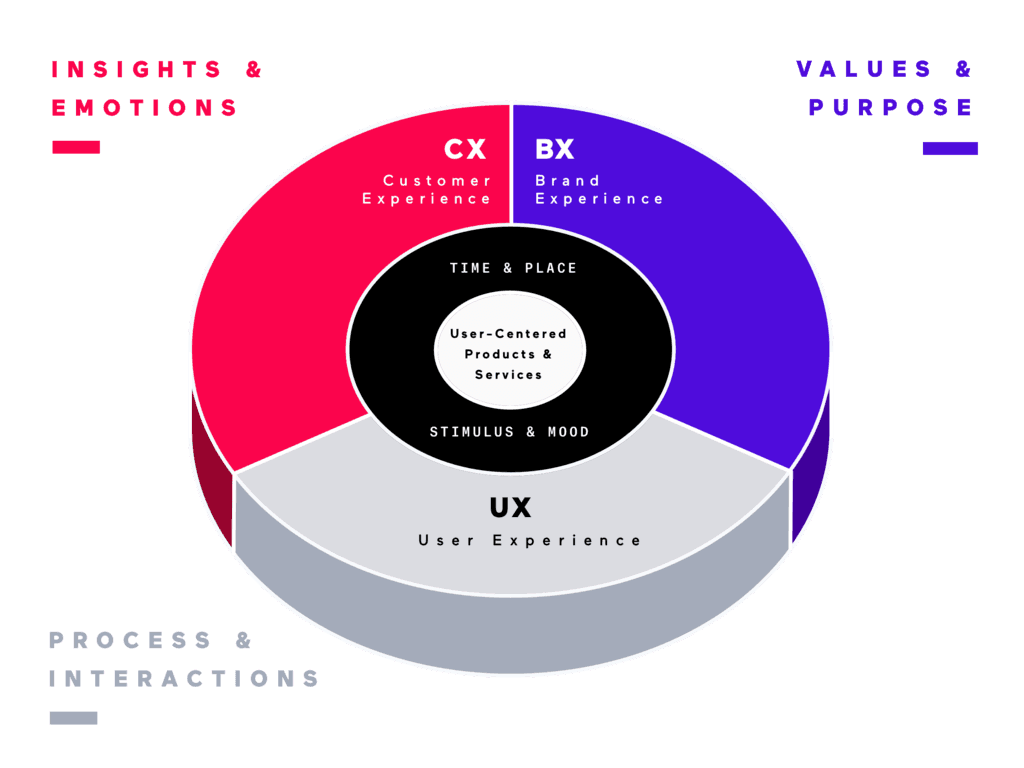
UX vs. CX: What's the Real Difference?
You've probably heard the terms "UX" (User Experience) and "CX" (Customer Experience) thrown around a lot. But what do they actually mean, and how do they differ? Understanding the distinction is crucial for crafting a successful online strategy, especially if you're looking to optimize your website for conversions. Let's break it down:
Customer Experience (CX): The Big Picture
Think of CX as the entire journey a customer takes with your brand. It encompasses every touchpoint, from the moment they first see your ad to the post-purchase support they receive. Consider this example:
Imagine you see an ad for a new set of headphones online. What makes you even consider clicking? That's CX at work! It's about understanding the emotions that ad elicits, exploring the reasons why you're drawn to that specific brand, and smoothing your path towards making a purchase. The ultimate goal of CX is to create a frictionless, positive experience from start to finish. CX is responsible for telling a compelling story, making you feel something, and capturing your attention – ultimately steering you towards making a decision.
User Experience (UX): The Nitty-Gritty
UX, on the other hand, is a component of CX. It focuses specifically on how a user interacts with a particular product or service, like your website or app.
Using the same headphone example, once you decide to visit the company's website and begin the ordering process, you've entered the UX realm. The goal of UX is to make that ordering process as easy, fast, and seamless as possible. Think clear navigation, intuitive forms, and a smooth checkout process.
UX in Action: Beyond Advertising
UX goes beyond just advertising. It delves into the thought processes and actual interactions a customer experiences while engaging with your company. It leverages user behavior to inform messaging and guide interface design. By understanding how users think and act, you can create a UX that anticipates their needs and provides a delightful, efficient experience.
In short:
• CX: The overall perception a customer has of your brand across all interactions.
• UX: The specific experience a user has when interacting with a particular product or service.
By focusing on both CX and UX, you can create a comprehensive strategy that attracts customers, keeps them engaged, and drives conversions. OneSpring is here to help you design the ultimate UX for your subscription service.
Frequently Asked Questions
What is the main difference between CX and UX?
CX (Customer Experience) is the entire journey a customer takes with your brand across all touchpoints—ads, website, sales, support, and beyond. UX (User Experience) is a component of CX that focuses specifically on how users interact with a particular product or service, like your website or app. Think of it this way: "CX drives emotion whereas UX drives interaction."
Is UX part of CX or are they separate?
UX is a component of CX, not separate from it. CX is the overarching practice that spans the entire organization (marketing, sales, IT, HR) and includes all customer touchpoints. UX sits within CX and handles the tactical, product-specific interactions. You can't have great CX without good UX, but UX alone doesn't guarantee a positive overall customer experience.
Can you give a simple example of CX vs. UX?
Imagine you see an ad for headphones online. The ad that makes you feel something and want to click—that's CX at work. Once you visit the website and start the ordering process, you're in the UX realm. CX got you interested and emotional; UX makes the checkout process easy, fast, and seamless. CX tells the story; UX makes the interface work.
Does CX only apply to external customers?
No—CX applies to both external and internal customers. While most people think of CX as customer-facing (marketing, sales, support), it also includes internal experiences like HR systems, IT tools, and employee portals. Any touchpoint where someone interacts with your organization—whether they're a paying customer or an employee—falls under CX.
What does "CX drives emotion whereas UX drives interaction" mean?
This means CX focuses on the feelings and perceptions customers have about your brand—the story you tell, the emotions you evoke, the reasons they choose you. UX focuses on the mechanics of interaction—how easy it is to navigate your site, complete a form, or checkout. CX answers "Why should I care?" while UX answers "How do I do this?"
How do CX and UX work together to drive conversions?
CX attracts and engages customers through compelling storytelling, brand perception, and emotional connection across all touchpoints. UX converts that interest into action by making interactions easy, intuitive, and frictionless. A great ad (CX) gets someone to your site, but a confusing checkout (poor UX) loses the sale. Both must work together to create a comprehensive strategy that attracts, engages, and converts.
Which should I focus on first—CX or UX?
You need both, but start by understanding your customer journey (CX) to identify where UX improvements will have the most impact. Map all touchpoints—ads, website, sales calls, support—to see where customers experience friction or delight. Then prioritize UX improvements at high-impact touchpoints like checkout, onboarding, or key product features. CX provides the strategy; UX provides the execution.