

Short answer: Replace the system in stages. Run the old and new versions side by side and move users over a piece at a time, so the business never bets everything on a system that hasn't been tested in real conditions.
If you're responsible for an application the business can't live without, and can't live with much longer either, this is for you. Here's how staged modernization works in practice, from the first discovery conversation to the day you switch the old system off.
Why big-bang rewrites fail
Big-bang rewrites fail because they take too long, miss rules nobody wrote down, and end in one risky switchover. The appeal is easy to understand: the old system is slow, it breaks in ways nobody can predict, and the people who built it moved on years ago. A clean rewrite promises to make all of that go away at once. In practice, it's one of the riskiest choices a team can make.
The first problem is time. A rewrite takes a long time, and the business doesn't wait. Requirements shift and regulations change while the team builds toward a spec that was written on day one, so the new system can be out of date before it launches.
The second is knowledge. Legacy systems carry years of business logic that lives in edge-case code, in the heads of long-tenured employees, and in workarounds nobody remembers creating. A rewrite from scratch tends to miss the rules nobody knew existed, and those rules surface in production, usually at a bad moment.
The third is the switchover itself. Eventually the old system goes dark and the new one takes over. If the new one has a serious flaw, there's no easy way back. For regulated or high-transaction systems, that isn't a risk you can absorb.
A big-bang rewrite forces you to be right about everything at once. Staged modernization lets you be right about one thing at a time.
Start with discovery, not a fixed-price rewrite
The most useful thing you can do before writing new code is learn what the old system actually does. This is rarely documented accurately or kept up to date. Over the years, the people who use it every day have filled the gaps with habits and workarounds, and those habits are often where the real business rules live. Discovery is how you find them while they're still cheap to handle.
Start with the people. Sit with the employees who use the system daily and ask what they do when it misbehaves. Their workarounds are often the most important business logic you have. Then trace real workflows from entry to completion, including the exception paths that only come up a few times a month. AI makes this a lot easier because you can feed it transcripts of information to help you synthesize what's important.
Next, look at the system itself. Read the code and the data: fields with names like override or do_not_use are usually load-bearing, and data quality is worth checking before you assume it will move cleanly. A year of error logs, support tickets, and manual overrides is just as revealing. Each recurring exception is a rule the system knows, and the documentation doesn't.
Record current behavior with characterization tests. These tests capture what the system outputs today, not what it should output. They give the team a safety net: any change that breaks existing behavior fails a test before it reaches users.
Inventory the data and its constraints. Note where data lives and what governs it, including security requirements, compliance obligations and vendor contracts. Finding these during migration is far more expensive than finding them now.
A partner that quotes a fixed price before understanding your system is pricing something it doesn't yet understand.
Decide what to redesign, rebuild or leave alone
Decide by weighing each part's value to the business against the risk of changing it, and expect the honest answer to be "not everything needs to change." Modernization budgets go furthest when they're spent on the parts that matter most to the business, not spread evenly across the whole system.
AWS's "7 Rs" of cloud migration (retire, retain, rehost, relocate, repurchase, replatform, refactor) offer a useful starting vocabulary. But most decisions come down to two questions: how much value would improving this part deliver, and how risky is it to change?
High value, lower risk: Redesign or rebuild first, for early wins
High value, higher risk: Rebuild carefully, with parallel running and output comparison
Low value, lower risk: Leave alone or defer
Low value, higher risk: Consider retiring it
Starting with high-value, lower-risk work gives users something better early and builds confidence for the harder pieces. If a component works, is rarely touched, and is risky to modify, leave it alone. That's discipline, not a lack of ambition.
Run old and new side by side
Running old and new systems side by side is the core of safe modernization. Instead of one switchover day, the old and new systems run together for a while, and work moves from one to the other in small steps you can check and, if needed, undo. A few well-established techniques make that possible.
Strangler fig. Named by software author Martin Fowler after a vine that slowly grows around a host tree, this pattern routes new requests to the new system while the old one handles everything else. Over time more traffic moves across, until the old system handles nothing and can be retired.
Branch by abstraction. Inside the codebase, the new implementation is built behind an abstraction layer, with a switch that controls which version runs. Teams can build and test the new path without disrupting the one people rely on today.
Keep data in sync. Running two systems means keeping their data consistent, usually with a sync layer that writes to both and reconciles differences. It adds work, and it's also what makes a safe rollback possible.
Roll out with feature flags. Move a small pilot group first. If outputs match and users are happy, extend to the next group. A high-stakes cutover becomes a series of small, reversible steps, designed to avoid planned downtime.
A good test for every step: could you undo it by the end of the day? If not, it's a cutover, not a step.
What a staged rebuild looks like
A staged rebuild usually moves through three phases: discovery, parallel build and migration, then switch-off. The exact shape varies with the system, but the rhythm is usually similar.
This is an illustration of the typical pattern, not a specific client engagement.
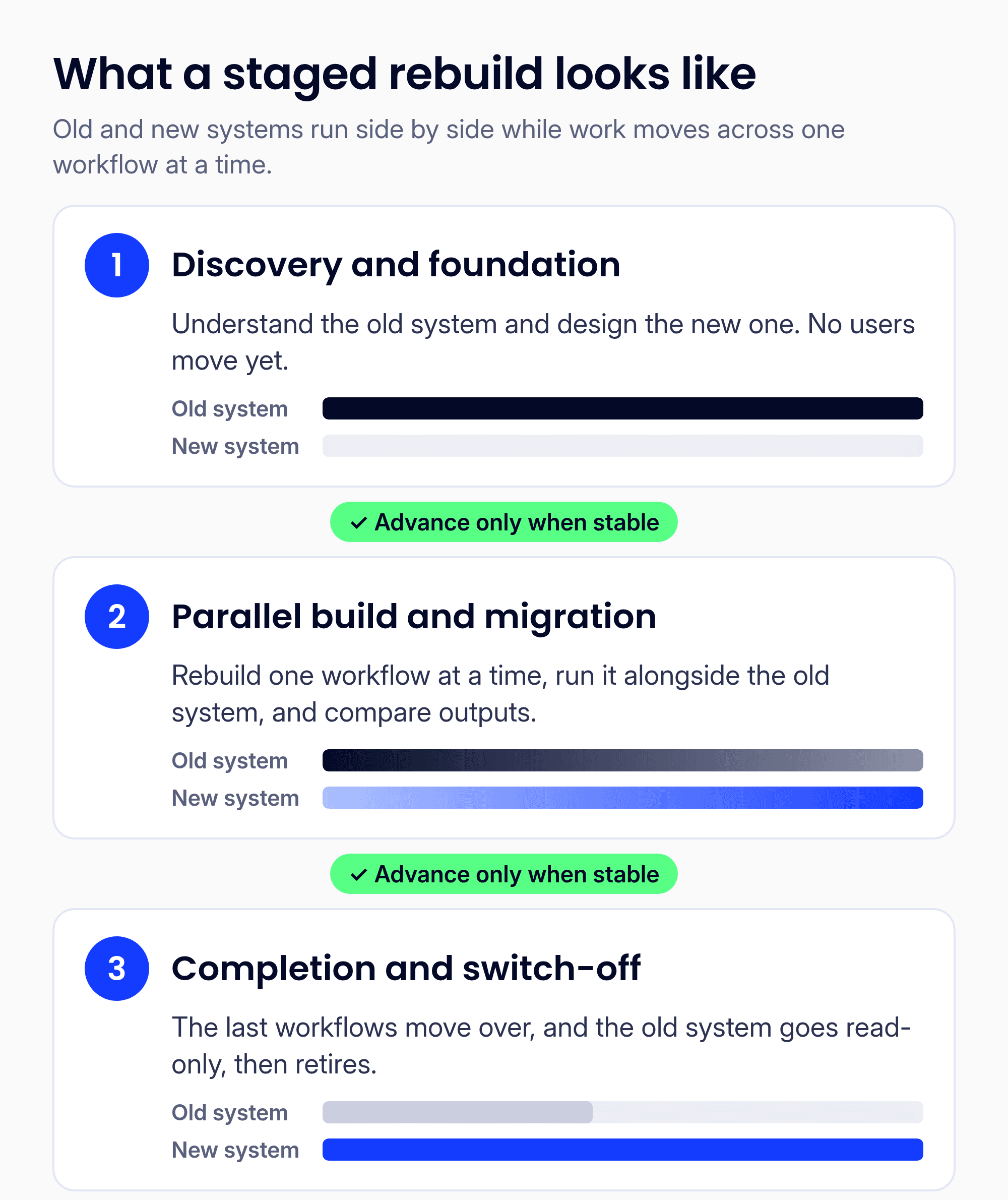
Figure 1. The three phases of a staged rebuild.
Discovery and foundation. Interviews, workflow tracing, code review and characterization tests. The new architecture is designed. No users move yet.
Parallel build and migration. The first workflow, chosen for high value and manageable risk, is rebuilt. A pilot group runs it in parallel with the old system, and the team compares outputs. Some mismatches are bugs in the new system; others are undocumented rules in the old one. Once it's stable, the team moves to the next workflow.
Completion and switch-off. The last workflows move over. The old system goes read-only for audit needs, then is retired, and the temporary bridging code is removed.
What makes this work is patience at each step: the team doesn't advance until the current step is stable. Skipping validation to save time brings back the risks of a big-bang rewrite.
Where AI helps, and where engineers stay accountable
AI is most useful in the slow early stages, where much of the time goes into reading and understanding old code. Used well, it takes on the repetitive parts so engineers can spend their time on judgment.
In discovery, AI can read and explain old code, surfacing dependencies and likely business rules faster than reading it line by line. It can draft documentation for the team to review and correct. It can write tests, which speeds up the characterization and output comparison that parallel running depends on. And it can help build the new version, with engineers reviewing every change.
What it shouldn't do is convert an entire codebase in one shot and ship it. Automated conversion tends to carry the old system's problems into the new one. AI also doesn't know whether a calculation is right for your regulations or whether an edge case matters to your customers. People make those calls and own every release.
People and process are part of the work
Modernization often stumbles on the organizational side, not the technical one. A new system can work perfectly and still fail if the people who depend on it don't trust it, weren't asked, or weren't ready.
The fix starts early. Involve users during discovery: people who are heard at the start adopt the new system with more confidence at the end. Explain what's changing and why, and keep explaining when plans shift. Plan for training and transition support that lasts beyond launch day. And keep the people who hold institutional knowledge involved throughout, because they'll spot problems no test will catch.
How you know you're done
You're done when the new system has proven it can carry the business on its own, not just on the day the last group moves over. In practice, that means:
Everyone has moved to the new system, and nobody routes around it.
The old system is switched off, with data still available for audit.
The temporary bridging code and sync layers are removed.
The new system has run through real cycles like month-end and seasonal peaks without problems.
Done isn't a launch date. It's a stretch of stable operation that proves the new system can carry the load.
How OneSpring approaches it
We redesign and rebuild critical business applications too important to fail. Design-led, AI-built, delivered in months, not years. We've rebuilt a critical application for a Fortune 1000 company in months, and modernized a regulated, high-transaction system. Founded in 2005 and based in Atlanta, OneSpring is an OpenAI Select Partner.
FAQ
How long does it take to modernize a legacy application?
It depends on the system's size, the number of workflows and how much documentation exists. A well-scoped rebuild can go from discovery to full migration in months; broader or more regulated systems take longer. Discovery gives you a realistic plan before you commit.
Can we keep the system running while we modernize?
Yes. The old system stays live throughout, and users move over one workflow or group at a time. The rollout is designed to avoid planned downtime, though some cutovers still need a short maintenance window.
What if nobody documented the business rules?
That's common. User interviews, workflow tracing, code review and characterization tests rebuild a working picture of what the system does. Missing documentation is a challenge, not a blocker.