

Short answer: Start with the people who use the application every day, and redesign the work before the screens. Then build and test the new version with them, measure it against a baseline, and roll it out in stages so they choose to use it.
If you've ever heard someone groan when an internal tool loads, you already know the cost. Usually the software isn't the whole problem. The tool just no longer fits the work, and that can be fixed. Here's how to turn it into something employees actually use.
Warning signs the app is failing its users
The clearest sign an application is failing is that people have started working around it. Employees rarely complain loudly about internal tools; they just quietly find other ways to get the job done. Those workarounds are worth paying attention to, because each one points to a gap the system no longer fills.
The most common is the shadow spreadsheet. When people track work in Excel or Google Sheets alongside the official system, the system isn't supporting their real work. That's a design problem, not a discipline problem. A close cousin is the workaround that has become part of the process itself: if the standard procedure includes "copy that into a separate tab" or "don't use that field, we track it in email," the app has been quietly abandoned in pieces.
Two other signs show up on the business side. When requested fixes pile up faster than they're resolved, continued patching often costs more than a redesign. And in our experience, if new hires need weeks to get comfortable with an internal tool, the interface is usually a big part of the problem, and that training cost repeats with every hire.
If two or more of these sound familiar, a visual refresh alone won't fix it. The real fix starts with understanding how people work today.
Research the existing app before changing anything
Start by studying how the current system is really used, before anyone draws a wireframe. Skipping this step is the fastest way to build the wrong thing, because what people say they do and what they actually do are often different.
A few research methods do most of the work. Contextual inquiry means watching people use the system in their real environment, which shows how they work rather than how they describe it. Shadowing someone through a normal day surfaces the small workarounds and hesitations they've stopped noticing. Timing the most common tasks shows which flows are slow and gives you a baseline to measure against later. And a workaround inventory, a list of every spreadsheet, sticky note and email thread filling a gap in the system, shows exactly what the software fails to do.
In practice, that means sitting with people during their normal day, asking them to talk through what they're doing and why, and noting every moment they hesitate, double-check, or leave the system to finish a task. Ask to see the spreadsheets and notes people keep on the side. These sessions also surface business rules nobody wrote down, which the new version has to respect.
Include employees with disabilities, such as screen reader and keyboard-only users. Accessibility belongs at the start of research, not at the end as a checkbox.
The output isn't a feature wish list. It's a clear picture of the actual work, where the tool falls short, and what those gaps cost. With that picture in hand, you can start redesigning, beginning with the work itself.
Redesign the workflow first, then the screens
Fix how the work flows before you touch how the screens look. A nicer-looking version of a broken process is still a broken process, and many of the steps people hate exist only because of limits in the old system. Redesigning the workflow is where you get to remove them.
The sequence is straightforward:
Map the current workflow as it really runs, workarounds included.
Redesign the workflow to remove steps that only exist because of the old system's limits.
Design screens around the new workflow.
Test prototypes in several rounds before writing production code.
This is an illustration of the typical approach.

Figure 1. Redesign the workflow first, then the screens.
Test with both current users, who know every quirk of the old system, and newcomers, who show whether the design is actually learnable. Give people real tasks from their day, watch where they get stuck, fix the design, and test again. Each round should be small and quick, so problems are cheap to fix while they're still on paper or in a prototype rather than in code.
Build to WCAG 2.2 AA from the start
As you design and test, build to WCAG 2.2 AA, the widely used web accessibility standard, from the first prototype. Internal apps are often the last place accessibility gets attention, even though the people using them every day include employees with visual, motor and cognitive disabilities.
Building to the standard means the app works for those employees, and the same improvements, like clearer labels, better contrast and full keyboard navigation, make it easier for everyone else too. Retrofitting accessibility later is more expensive and less complete.
Keep design and engineering on one team
Put design and engineering on a single team that owns both the experience and the code. The classic failure in internal redesigns is the handoff: designers write specs, engineers build something different, and the gap grows every sprint until the finished product looks nothing like what users tested.
One team avoids that, and it also keeps the design grounded. The new experience has to work within the existing system's real limits, including backend data structures, security models and permissions. When engineers sit in design sessions and designers understand what the data can and can't do, the team designs things it can actually ship. Once that team has a version users trust in testing, it's ready for a wider rollout.
Roll out in stages, with change management
Roll the new version out gradually, so people have time to adjust and the team has time to fix what they find. Even a well-designed system feels unfamiliar on day one, and how the first few weeks go shapes whether people trust it.
Start with a pilot group that represents the wider team, including power users of the old system and newer employees. Collect structured feedback, fix what comes up, and then expand team by team, with targeted training for each group rather than generic documentation. Move everyone over once the main friction is resolved.
This is an illustration of the typical approach.
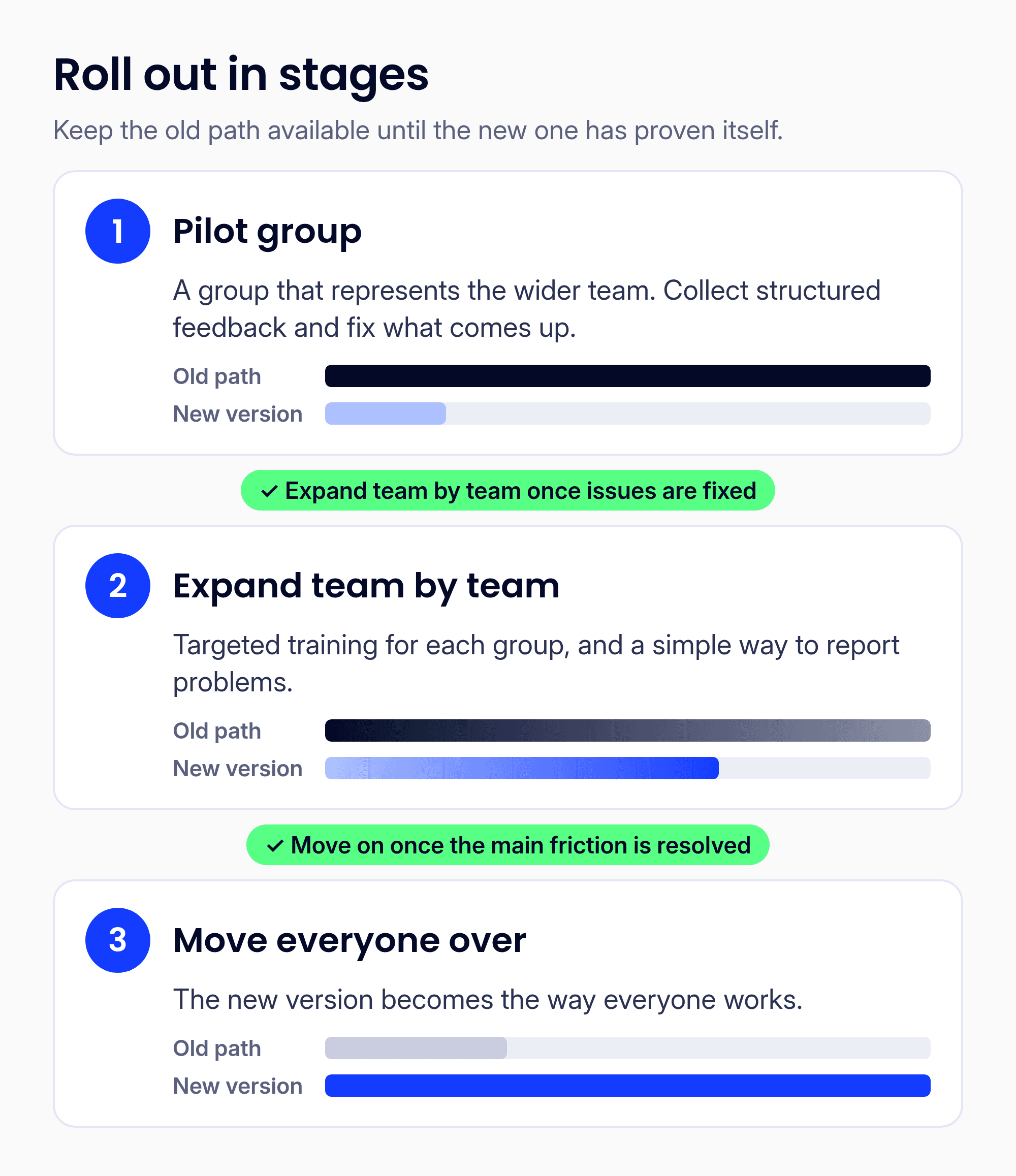
Figure 2. A staged rollout, with the old path available until the new one has proven itself.
Keep the old path available during each stage until the new one has proven itself, so nobody is stuck if something goes wrong. Give people a simple way to report problems, and fix what they flag quickly; visible responsiveness in the first weeks builds more trust than any launch email.
In our experience, the employees who took part in research and testing make the most credible advocates, because they helped shape the new system and can speak from experience. Once people have moved over, the next question is whether it's actually working.
Measure adoption, not just launch
Measure whether people are actually working faster and more easily, not just whether the new version went live. A launch date tells you the work shipped; adoption tells you it worked.
Two measures carry most of the weight. The first is task time, compared against the baseline from research: if key tasks aren't faster, revisit the workflow. The second is the System Usability Scale (SUS), a standard 10-question survey scored from 0 to 100, where about 68 is average. Run it before the redesign and after rollout, and compare.
Supporting signals include shadow spreadsheets being retired and new hires getting up to speed faster. Together they give leadership evidence, not anecdotes. Keep measuring after launch, too; adoption often dips briefly as people adjust, and the trend over the first few months tells you more than the first week.
What a redesign looks like
Here's how those steps can come together on a single application.
This is an illustration of the typical pattern, not a specific client engagement.
Picture an operations team that processes customer orders in an internal application built years ago. Entering one order takes eleven screens, so most people keep a shared spreadsheet to track status, and only two long-time employees know which fields to skip.
Research. The team shadows a dozen users across a normal week, times the five most common tasks, and collects every side spreadsheet. They find that three of the eleven screens exist only because of a limit in the old database, and that the spreadsheet tracks a status the system never shows. They also run a SUS survey to set a baseline.
Workflow redesign. With the users, they map the order process end to end and cut it down to the steps the business actually needs. The missing status becomes a visible part of the flow, so the spreadsheet has no reason to exist.
Prototype rounds. Over several short rounds, they test clickable prototypes with experienced users and two recent hires, fixing confusing labels and reordering fields each time. A keyboard-only user tests every round.
Build and rollout. One team designs and builds the new front end on top of the existing backend, working within its data and permission rules. A pilot group uses it for a few weeks while the old screens stay available. Issues get fixed, then the rest of the team moves over with short, task-based training.
Measurement. The team re-times the same five tasks, re-runs the SUS survey, and checks whether the shared spreadsheet is still being used. Those numbers, not opinions, decide what to improve next.
How OneSpring approaches it
We redesign and rebuild critical business applications too important to fail. Design-led, AI-built, delivered in months, not years. Our work includes a Fortune 1000 rebuild delivered in months. In business since 2005 and based in Atlanta, OneSpring is an OpenAI Select Partner.
As one client put it: "The UX-led redesign transformed our HR platform, making it more intuitive, efficient, and user-friendly while enhancing governance and employee engagement."
FAQ
Does the backend have to change before the experience can improve?
Not always. Many redesigns start with a new front end built on the existing backend, working within its data, security, and permission rules. Employees get a better tool sooner, and the cost of modernization is spread over time. Early user research will tell you whether the backend is really what's holding the app back.
How do we get employees on board?
Involve them before the design is finished. Pair that with a staged rollout, practical training and a clear way to report problems.
Who can handle both design and engineering?
Look for a partner that runs design and engineering as one team and has rebuilt business-critical applications end to end. That's how OneSpring works.