
Key Takeaways
**Challenge:** 61 million Americans (1 in 4 adults) live with disabilities, yet most websites fail accessibility standards—creating frustrating experiences for users with vision, mobility, cognitive, or hearing impairments
**Solution:** Integrate accessibility and Section 508 compliance into the design process from the start, not as an afterthought
**Broader Impact:** Accessibility benefits everyone—including users with temporary disabilities (broken arm), color blindness, neurodiversity (dyslexia, ADHD), and situational constraints (noisy environment, holding a baby)
**Implementation:** Test early iterations for accessibility, use certified DHS Trusted Testers for government projects, or incorporate automated tools like AccessiBe or Axe Dev Tools
Accessing Information on the Internet
Accessing information on the internet can sometimes be an incredibly frustrating experience for those individuals with disabilities. Software accessibility issues are common and often go unresolved and unnoticed. The good news is there are many experts who specialize in accessibility testing. In this article, I'll talk a little about the accessibility problem and some solutions.
The Size and Scope of the Challenge
Firstly, let's start with the size and scope of the challenge. According to the CDC, 61 million (1 in 4) adults in the US live with a disability (cdc.gov). The CDC also reports that:
12 million people 40 years old and over in the United States have vision impairment, including 1 million who are blind (cdc.gov)
1 in 7 adults have mobility issues and with age disability becomes more common, affecting about 2 in 5 adults 65 and older (cdc.gov).
Over 16 million people in the United States are living with cognitive impairment (cdc.gov)
The National Institute on Deafness and Other Communication Disorder's 2021 report noted that 1 in 8 people in the United States (13 percent, or 30 million) aged 12 years or older have hearing loss in both ears, based on standard hearing examinations (nidcd.nih.gov).
Designing for Accessibility
As UX Designers and Researchers, making this experience intuitive is what we specialize in; however, that often operates under the assumption that users navigate the web with the full functionality of a mouse, keyboard, screen, and speakers. If this assumption fails to hold true (i.e. someone cannot use a mouse, see the screen, or hear their speakers), our designs might inadvertently alienate a significant population of our users and fail the exact people we were initially trying to help.
To accommodate individuals with disabilities, accessibility and 508 compliance need to become a core part of the design process. If you are not familiar with Section 508 of the Rehabilitation Act, it is a set of standards that requires Federal agencies to make Information and Communications Technology (ICT) accessible to employees and members of the public who have physical, sensory, or cognitive disabilities.
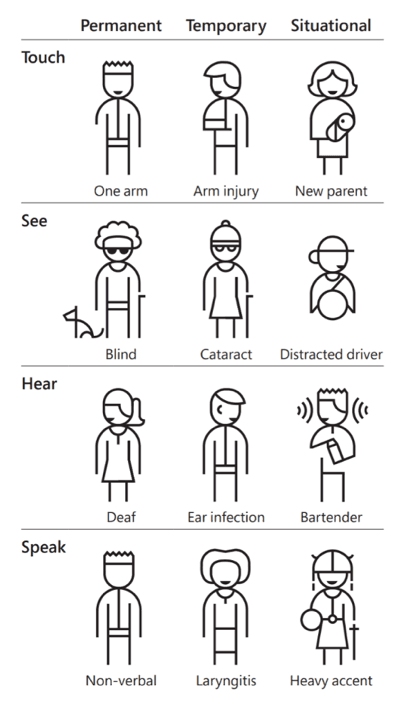
Figure 1: A sample of possible permanent, temporary, and situational disabilities.
As OneSpring's Senior UX Designer, Sara Tung, pointed out, "User experience is improved for everyone when accessibility is considered in the design." When thinking of accessibility, people typically think of permanent disabilities such as visual impairment or hearing impairment; however, it covers a much wider scope of users including (but not limited to) someone with:
Limited mobility due to a cast or sling
Color blindness
Neurodiversity, including dyslexia and ADHD, among others.
A situational or environmental constraint such as a noisy room or new baby you need to hold in your arms
Designing for accessibility allows everyone, no matter their circumstance, to interact with your designs and content. Testing even the initial iterations of a website for accessibility will both minimize rework over the development life-cycle and give the entire team a much better idea of what is needed for a website to be accessible.
Therefore, having someone who is certified in accessibility testing on your team is important to make sure it's performed correctly. For example, some government projects require certified Department of Homeland Security (DHS) Trusted Testers to be on the team. Becoming a Trusted Tester is a commitment, which requires several weeks to complete (see this article to learn more).
Incorporating Accessibility into Development
To incorporate accessibility into your development life-cycle, consider bringing on a specialist in this area. Alternatively, you could incorporate automated services like AccessiBe, COMPLYFirst, or Axe Dev Tools into the life-cycle to identify and change inaccessible parts of your application as it's being developed. The bottom line is that making sure your application is accessible helps ensure the experience is improved for all users.
Frequently Asked Questions
Why is web accessibility important for all users, not just those with disabilities?
Accessibility improvements benefit everyone, not just users with permanent disabilities. When you design for someone with limited mobility (cast or sling), color blindness, neurodiversity (dyslexia, ADHD), or situational constraints (noisy room, holding a baby), you create better experiences for all users. Accessible design means clearer navigation, better contrast, simpler language, and more flexible interaction methods.
How many people are affected by accessibility issues on the web?
According to the CDC, 61 million adults (1 in 4) in the US live with a disability. This includes 12 million with vision impairment (1 million blind), 1 in 7 with mobility issues (2 in 5 adults 65+), 16 million with cognitive impairment, and 30 million (1 in 8) with hearing loss in both ears. These numbers don't include temporary or situational disabilities, making the actual impact even larger.
What is Section 508 compliance?
Section 508 of the Rehabilitation Act requires Federal agencies to make Information and Communications Technology (ICT) accessible to employees and the public with physical, sensory, or cognitive disabilities. While it's a legal requirement for government projects, Section 508 standards (based on WCAG guidelines) represent best practices that benefit all organizations by ensuring inclusive digital experiences.
When should accessibility testing happen in the development lifecycle?
Test accessibility in the initial iterations of your website, not at the end. Early testing minimizes rework throughout the development lifecycle and gives the entire team a clear understanding of accessibility requirements. Waiting until launch to test accessibility creates expensive fixes and delays. Build accessibility into your design process from day one.
What are DHS Trusted Testers and when are they required?
DHS (Department of Homeland Security) Trusted Testers are professionals certified in accessibility testing using specific methodologies and tools. Some government projects require certified Trusted Testers on the team to ensure compliance with Section 508 standards. Becoming a Trusted Tester requires several weeks of training and commitment, but provides deep expertise in accessibility evaluation.
What automated tools can help with accessibility testing?
Automated tools like AccessiBe, COMPLYFirst, and Axe Dev Tools can identify and flag inaccessible parts of your application during development. These tools catch common issues like missing alt text, poor color contrast, and keyboard navigation problems. However, automated tools should complement—not replace—manual testing and expert review, as they can't catch all accessibility issues.
How do you incorporate accessibility into your development process?
Three approaches: (1) Bring on an accessibility specialist or certified DHS Trusted Tester to guide the team; (2) Incorporate automated accessibility tools into your development lifecycle to catch issues early; (3) Train your design and development teams on accessibility best practices so it becomes part of their standard workflow. The key is making accessibility a core part of the process, not an afterthought.