Improving efficiency and navigation for fleet management Enhancing usability for the MyLeasePlan mobile app


Key Takeaways
MyLeasePlan app users struggled to find fuel card PINs, manually entered mileage, and found insurance document uploads confusing
OneSpring conducted moderated usability testing and drove targeted design improvements to navigation, mileage auto-calculation, and document upload flows
Task completion became more intuitive, mileage reporting errors decreased, and overall user satisfaction scores increased across fleet management workflows
Background
MyLeasePlan conducted a usability test study to refine the user experience of its mobile app, ensuring that business professionals and fleet managers could seamlessly access essential features.
The goal was to understand how users interact with the app when performing critical tasks such as reporting mileage, accessing fuel card PINs, retrieving vehicle registration, and scheduling service appointments. The research leveraged both moderated and unmoderated testing methods, allowing participants to provide real-time feedback while completing predefined scenarios.
Challenge
The research identified significant usability challenges that impacted the efficiency of task completion. Users struggled to locate crucial information, such as fuel card PINs, within the app’s navigation, often resorting to multiple attempts before success.
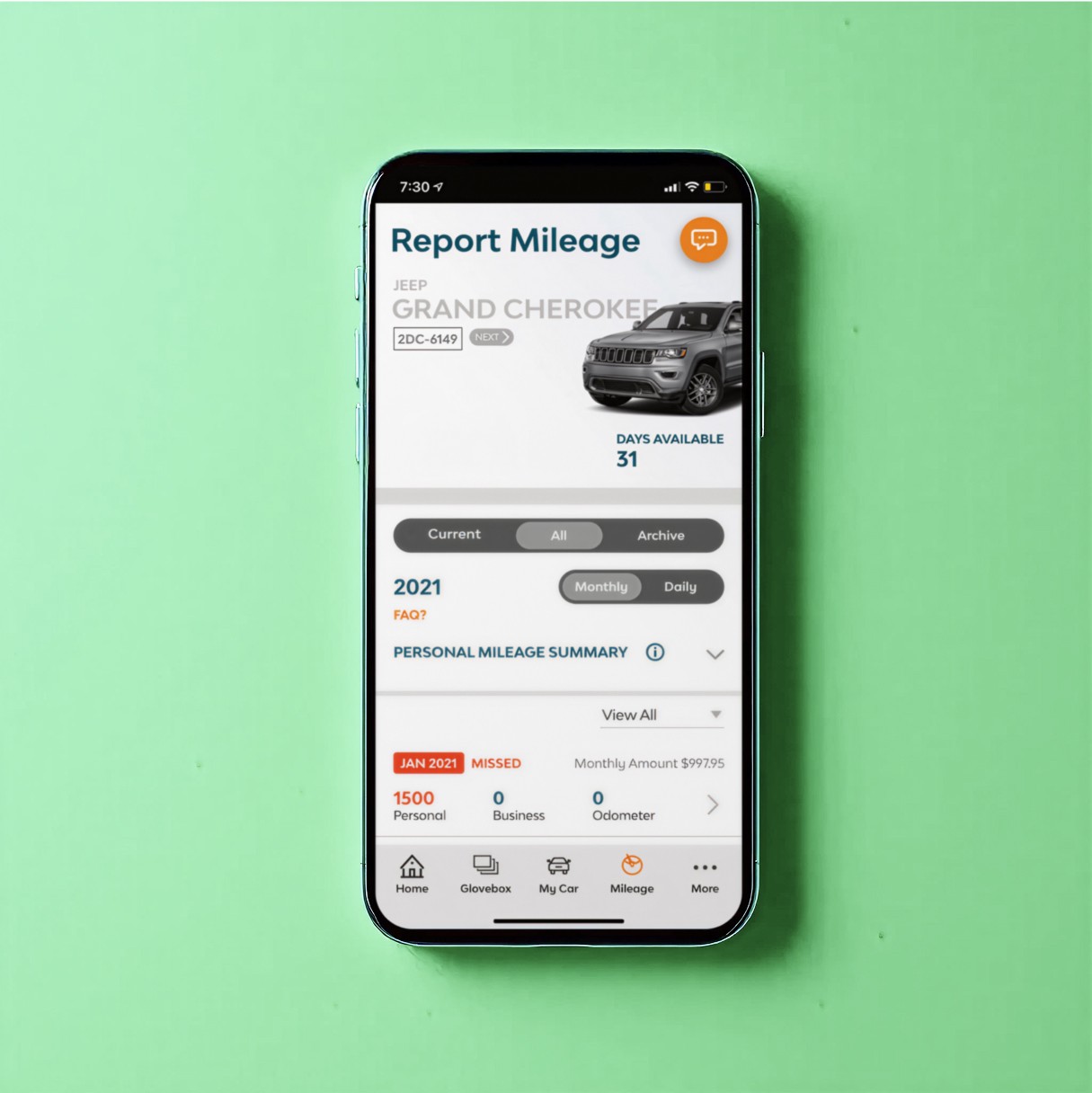
The process of reporting mileage lacked automation, requiring manual entry rather than auto-calculating business and personal mileage from previous readings. Users also found difficulties in retrieving vehicle service history and expected the app to provide easier access to previously used service centers.
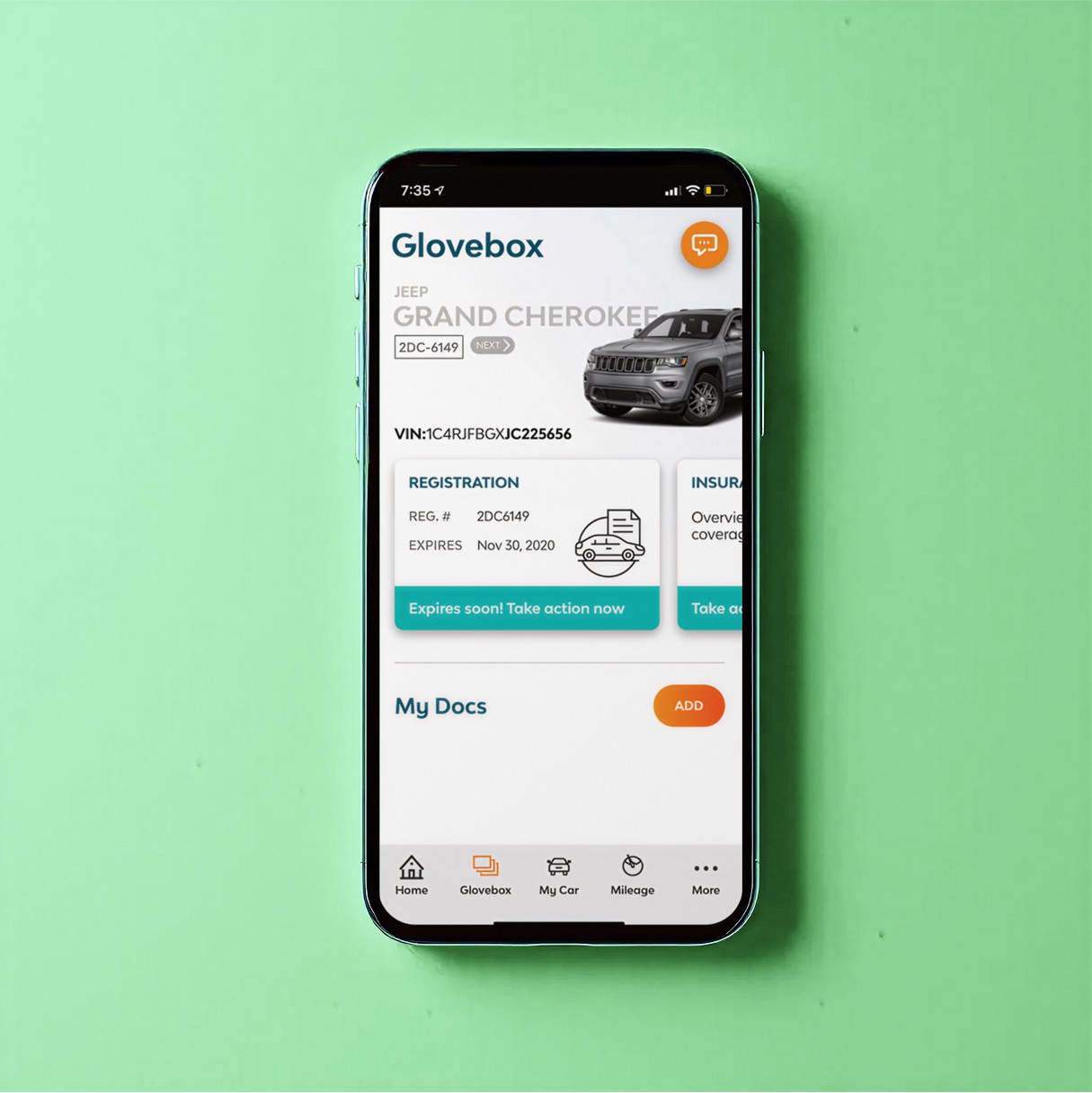
Additionally, uploading insurance documents was not intuitive, with dropdown selections leading to confusion and increased room for error. These usability gaps resulted in frustration and inefficiencies, making the app less effective for its core users.
Solution
To address these issues, MyLeasePlan implemented targeted design improvements to enhance usability and streamline workflows.
The navigation structure was optimized by making critical features, such as fuel card PIN retrieval, more accessible. Mileage reporting was improved by introducing auto-calculation based on previous entries, reducing the need for manual input.
The vehicle service section was redesigned to include a history of previous service visits and a prominent display of preferred service centers.
The insurance document upload process was simplified by removing dropdown selections and replacing them with a direct photo upload option. Visual enhancements, including clearer action buttons and intuitive color coding for important notifications, further refined the user experience.
Results
The usability enhancements significantly improved user interaction with the MyLeasePlan mobile app. Participants reported that task completion became more intuitive, reducing the time spent searching for essential features.
The automated mileage calculation reduced manual input errors and increased accuracy in reporting. Improved navigation allowed users to retrieve service history and fuel card information with fewer steps. The streamlined insurance upload process minimized errors and made document submission more efficient.
Overall, user satisfaction scores increased, reinforcing the effectiveness of these design improvements in enhancing fleet management operations.
Reduced navigation errors
40%
Increased task completion
30%
Better user satisfaction
50%
Conclusion
By conducting usability testing and implementing research-driven design refinements, MyLeasePlan successfully enhanced the app’s user experience. The updates improved navigation, reduced errors, and streamlined critical workflows, making fleet management more efficient for business professionals and leaseholders.
“The MyLeasePlan app updates have made our fleet management tasks much more efficient. Finding key information is now seamless, saving us time and reducing frustration."
– Fleet Operations Manager
Frequently Asked Questions
What usability problems did MyLeasePlan's mobile app have?
Users struggled to find fuel card PINs buried in the navigation, had to manually enter mileage without auto-calculation from previous readings, couldn't easily access service history or preferred service centers, and found the insurance document upload process confusing due to unclear dropdown menus.
How did usability testing improve the MyLeasePlan fleet management app?
OneSpring conducted moderated and unmoderated usability tests, having participants complete real tasks while providing live feedback. This revealed specific navigation failures and workflow gaps that weren't visible from app analytics alone — and directly informed the design improvements that followed.
What UX improvements were made to the MyLeasePlan mobile app?
Key improvements included making fuel card PIN retrieval more accessible, adding automatic mileage calculation from previous entries, surfacing service history and preferred service centers prominently, replacing confusing dropdowns with a direct photo upload for insurance documents, and adding clearer action buttons and color-coded notifications.
Why does fleet management software need better UX design?
Fleet managers and drivers use these apps in high-pressure, time-sensitive situations. Friction in finding critical information — like a fuel card PIN during a fill-up — directly impacts operational efficiency and driver satisfaction. Poor UX creates real business costs through wasted time and increased errors.
How did mileage reporting automation reduce errors for fleet drivers?
Manual mileage entry requires drivers to remember and type previous odometer readings, which is error-prone. By auto-calculating business and personal mileage from the last recorded reading, MyLeasePlan eliminated a common source of inaccuracy and reduced the time drivers spent on administrative reporting.
What is moderated usability testing and how did it help LeasePlan?
In moderated usability testing, a facilitator guides participants through tasks in real time, asking follow-up questions and observing hesitations. For LeasePlan, this method captured nuanced frustrations — like the mental effort required to find a fuel card PIN — that would not appear in unmoderated data alone.
How can mobile UX design improve efficiency for field workers?
Field workers need fast, distraction-free access to key information. Good mobile UX means putting the most-used features one tap away, minimizing manual data entry, and designing for real-world conditions like one-handed use and time pressure. These design principles directly reduced task time for MyLeasePlan users.